
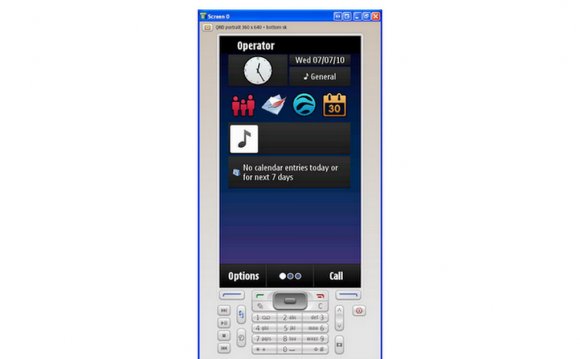
Tango Theme Skin

Another great theme that I want to share with you all today. This theme is based on Tango Style Guidelines and Tango Icon Theme. It is very lite and very cute with its own icons.

s60-tango-idle

Tango Symbian60 Theme developed by mszulecki. I really like this theme because it is lite. Everything is smooth and fast. Let say when I want to open the Main Menu, in just a snap, the Main Menu is open. Previous theme that I use was take about 1 second to open but this theme is cool. Very fast! I am so impressed!

Read more…

Screenshot for Nseries

My friend ask me how I took screenshots from my Nokia N73 ME and posted them to my website. I told him that I did some magics and poof!, suddenly my N73ME took the screenshots for me. Hahaha. It was a joke.

I actually use an application called Screenshot to take the screenshot for my N73ME. Screenshot is free. You can download it from here and install it like you install other software to your phone.

screenshot s60 3rd

I wish I could publish the Screenshot interface and the settings here, but my friend had borrowed my Nokia cable. So I couldn’t transfer the screenshots taken to my PC.

Screenshot can save the images in JPEG, PNG, BMP or MBM format. I don’t have any idea what MBM really is. I am so lazy to find out. But the quality image taken using Screenshot is really good. Really sharp. You can see the quality of the images taken from my previous posts.

Read more…

Advanced Device Locks - Protect your applications

I was looking for application that can lock certain applications like messages, gallery, application manager, and so on. After did some searching and I found this security application — Advanced Device Locks.

Advanced Device Locks (ADL) is an application that can help you to protect certain applications that you want it to be private. This application will ask user to enter correct lock code before it can allow the user to use the protected application.

Screenshot0006
Image 1: ADL main interface

Screenshot0008
Image 2: ADL change lock code

Screenshot0009
Image 3: ADL Options

Screenshot0007
Image 4: Protect your applications

Screenshot0010
Image 5: ADL in actions

To use this application is easy. Open ADL and go to Options (Image 3). From there, you select Protect Applications and choose which applications that you want to protect. Once finished, press Done and ADL will ask for a lock code to accept the changes made.

Read more…

Dark Teal Theme Skin

I found a nice, smart and clean theme from Nokia N95 Blog. That theme is use on N95 phone but I can run it on my Nokia N73 Music Edition. No worries. It support Nokia that uses Symbian OS s60.

This theme name is Dark Teal. You can download the theme from here. Here are some screenshots taken from my phone.

Screenshot0001 Screenshot0003

Screenshot0002 Screenshot0004

Read more…

How to update Nokia firmware?

It is really recommend updating your Nokia firmware to the latest version. Each new firmware usually contains bug fixes, new applications, make your Nokia runs faster, and many more.

Check for latest firmware version

  1. To check whether you are using the latest firmware, you need to enter *#0000# from the keypad.
  2. Then it will display what version you are using and the release date of the firmware. Eg: 4.0736.3.2.1
  3. Open up the back case and pull out the battery. We are looking for product code that we need to check for latest firmware. You will see the product code on the white label sticker on it. Eg: 0539343. Note it down.
  4. Go to this page, enter the product code and hit Go. It will display latest version based from the product code given.
  5. If new version is available, you can update your firmware through the Nokia Software Updater.

Read more…

N95 Classic new firmware - 20.0.015

New firmware is available for Nokia N95 Classic model. Firmware version 20.0.015 is the latest firmware that includes more functionality and improvements.

  • New Welcome application
  • New camera software and tweaks from the 8GB model.
  • Long press on camera button launches camera if shutter is open
  • New My Nokia SMS tips and mobile web portal system
  • Demand paging (for ROM applications) with 30 plus MB free RAM after booting.
  • Search 4.0 integration on standby screen.
  • N-Gage game previews (FIFA, Asphalt) and portal/shortcut to upcoming N-Gage client
  • Nokia Music Store client
  • Keypress bug gone
  • No auto-screen rotation

Get more info and screenshots at All About Symbian.

N95 8Gb new firmware - 11.0.026

n958gbv11

There is new firmware available for N95 8Gb through the Nokia software update service. The new firmware version is 11.0.026.

[via All About Symbian]

Video: Nokia N95 8Gb Production in Finland

Note: The video is no longer available. Due to copyright complaint by Nokia Corporation, the video has been removed from Youtube database. Sorry guys…

See how they combine all the pieces and become one set of Nokia N95 8Gb phone.

How to change Nokia N95 8Gb langauge packs?

So you don’t like your the default language that comes with your N95 8Gb phone? Want to get your preferred language? Here is how to do it.

But before we start, you must first get Nemesis Service Suite and the latest Nokia Software Updater. We need these tools because we are dealing with the product code. We want to change the product code so we can download the language that we want from Nokia server.

  1. Connect your phone to your PC.
  2. Open Nemesis Service Suite and click on “Scan for new device”.
  3. Click on “Phone info” icon and click “Scan”.
  4. Change the product code. I have listed the product code below.
  5. Press “Write” to change your product code.
  6. Close Nemesis Service Suite and run Nokia Software Updater.
  7. Update your phone firmware and wait until the update process finished.
  8. Your phone will has your preferred language after your phone restarted. Good luck! :)

Nokia N95 8GB Product Codes

  • #0550348: FRANCE
  • #0550352: ALPS
  • #0549487: EURO1
  • #0550359: EURO2
  • #0550370: TURKEY
  • #0550372: SCANDINAVIA
  • #0550373: BALTIAN
  • #0550798: RUSSIAN
  • #0550799: UKRAINE
  • #0550800: BELARUS/MOLDOVA
  • #0550375: CIS, Bulgaria
  • #0550378: EURO3
  • #0550379: BALKANS
  • #0550801: GREECE, CYPROS
  • #0550802: ISRAEL
  • #0555180: SINGAPORE
  • #0555181: MALAYSIA
  • #0555187: EMERGING ASIA
  • #0550455: INDONESIA
  • #0550454: NEW ZELAND
  • #0550453: AUSTRALIA
  • #0550459: THAILAND
  • #0550457: VIETNAM
  • #0550805: ARABIC

Note: These product codes are only for N95 8Gb model only.

via The Nokia Blog

WorldMate - World in your pocket

NokiaN95

So you travel a lot and want to have something as your guide? WorldMate is the best application for you.

WorldMate is a freeware application for your Nokia S60 which provides you with critical travel information. It will give you:

  • whethercaster
  • world clocks
  • whether forecast
  • currency converter and exchange rate service
  • world day/night map
  • comprehensive flight schedules
  • real-time flight status
  • satellite whether imagery

If you like to download directly to your phone, just enter http://mobile.mobimate.com/s60 in your mobile browser and follow the instruction given. But if you prefer to download to your computer and then move it to your phone, you do so by download WorldMate from here.